
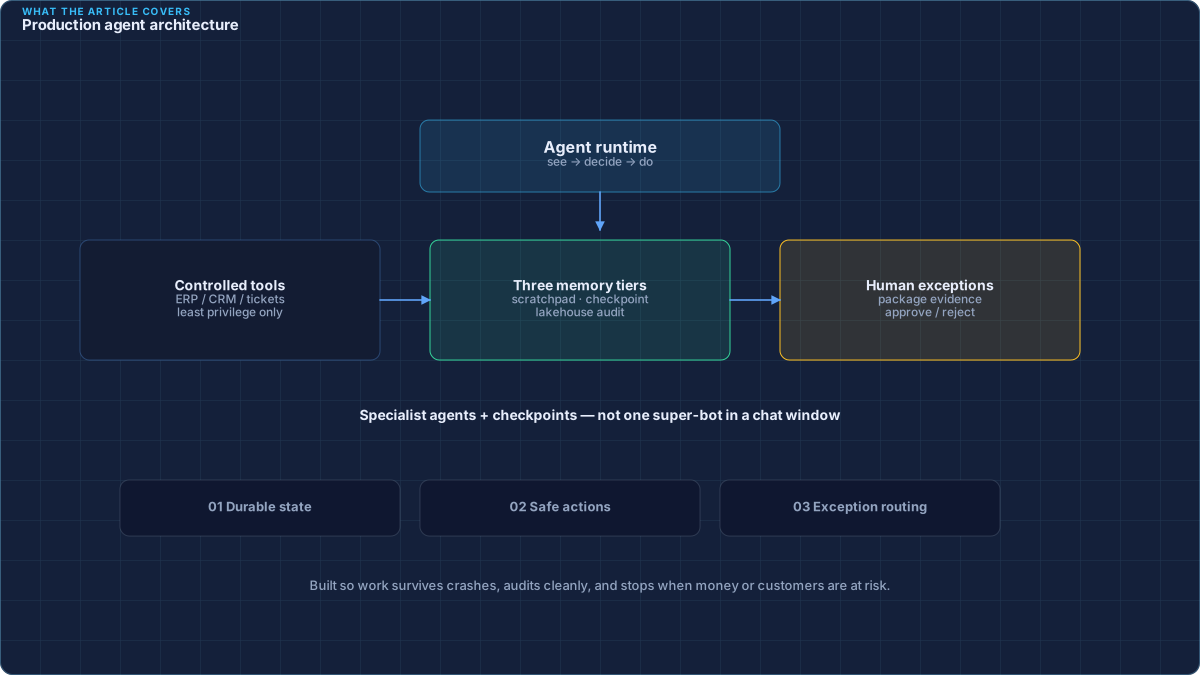
1. What “production agent” really means
When people say “AI agent,” they often mean a chatbot that answers questions. That is useful — but it is not what enterprises need for day-to-day operations.
A production agent is software that can:
- See what is happening (a new invoice, a late shipment, a support ticket),
- Decide the next safe step using rules plus AI judgment, and
- Do something useful in your systems (update a record, request approval, open a ticket) — with a full audit trail.
In short: it is less like a clever search box and more like a careful junior employee who never gets tired, but always asks a human when confidence is low.
2. Why chatbots fail at real work
Most early pilots fail for boring reasons — not because the AI model is “not smart enough.” Modern frameworks (like LangGraph or LlamaIndex) still fail without strict engineering discipline around state, tools, and evaluation.
Typical failure modes:
- No reliable memory. The system forgets what it already did if the browser refreshes or a vendor API times out.
- No safe actions. The bot can talk about fixing an invoice but cannot update the finance system (or worse, updates it without checks).
- No ownership of exceptions. When something is unclear, the issue disappears into a dashboard nobody watches until month-end.
- Demo data only. Real invoices are messy: missing fields, PDFs, mismatched purchase orders, foreign currencies.
Building agents for the enterprise is therefore a software engineering problem first — reliability, security, observability — and a model-prompting problem second.
3. Three kinds of memory (simple view)
Think of memory the way a careful office worker does — not as one big notepad, but as three drawers:
- Scratchpad (short-term). What the AI is thinking about right now — like sticky notes on a desk. This is the model’s temporary context. It should not be the system of record.
- Checkpoint (in-progress work). “I already matched the invoice header; I still need the line items.” This lives in a fast database (often Redis or PostgreSQL) so work can resume after a failure.
- Company memory (history & analytics). Approved outcomes, audit logs, and trends stored in a data platform such as Snowflake or Databricks, organized with tools like dbt so finance and ops can trust the numbers.
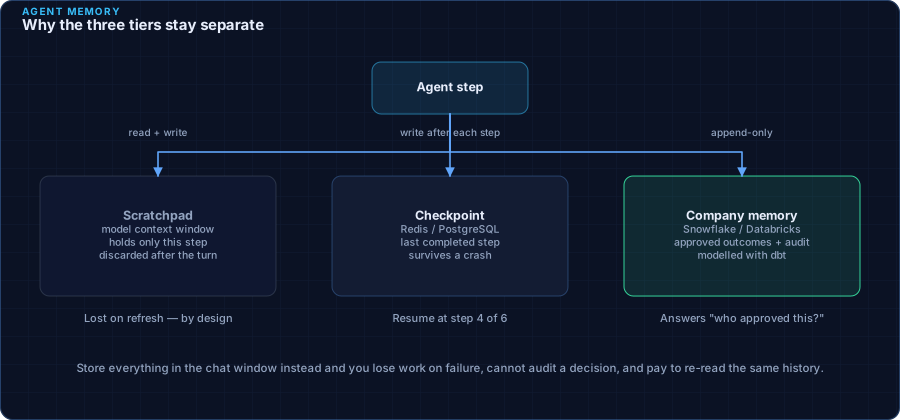
Why separate them? Because if you store everything only in the AI’s chat window, you lose work when sessions end, you cannot audit decisions cleanly, and you pay again every time the model re-reads the same history.
| Memory type | Everyday analogy | Typical tech | What it is for |
|---|---|---|---|
| Scratchpad | Sticky notes on a desk | Model context window | Assemble the next decision |
| Checkpoint | Folder of “work in progress” | Redis / PostgreSQL | Resume after failures; avoid rework |
| Company memory | Filing cabinet + reporting | Snowflake / Databricks + dbt | Audit, analytics, long-term learning |
4. Teams of agents, not one super-bot
One giant agent that tries to parse PDFs, write SQL, call APIs, and email vendors at once becomes hard to test and harder to trust.
When Cloudadorn embeds engineers, we design small specialist agents that work as a team:
- Worker agents do focused jobs in parallel (extract fields, check policy, fetch vendor history).
- A coordinator passes clean, structured results from one step to the next.
- A judge agent (or hard-coded rules) blocks unsafe writes — for example, “do not post this payment if confidence is below 95% or the amount exceeds policy.”
This mirrors how human teams already work: specialists, handoffs, and a final approver for high-risk steps.
5. Exceptions to people — not dashboards
Most companies find out about failures too late — via a red chart on a dashboard. By then, customers are waiting and controllers are firefighting.
Production agents should reverse that:
- When the agent is unsure, it packages the problem (what it saw, what it recommends, what is blocked).
- It sends a clear request to a human in Slack, Teams, or email — with a one-click approve / reject path.
- Every decision is logged for audit (who approved, when, and why).
People stay in control of judgment. Software removes the copy-paste and the hunting for context.
6. A practical build checklist
Whether you embed engineers from Cloudadorn or use your internal team, follow this order:
- Pick one painful workflow with clear dollar or time impact (e.g., AP exceptions, claims triage, shipment delays).
- Map systems of record — where truth lives today (ERP, CRM, warehouse, ticket tool).
- Define safe actions — what the agent may do alone vs. what needs a person.
- Add checkpoints — save progress after each major step.
- Measure — time saved, exception rate, false approvals, cost per run.
- Expand — only after the first workflow is boringly reliable.
7. Code snapshot (for engineers)
The idea below is simple: save structured progress after each step so retries do not redo expensive AI calls.
import redis
from pydantic import BaseModel

class InvoiceState(BaseModel):
    invoice_id: str
    amount: float
    vendor_id: str
    status: str
    checkpoint_step: int

class ProductionAgentRunner:
    def __init__(self, redis_url: str):
        self.r = redis.from_url(redis_url)

    def save_checkpoint(self, session_id: str, state: InvoiceState):
        # Persist progress so a crash does not lose completed work
        self.r.set(f"agent:checkpoint:{session_id}", state.model_dump_json())

    def resume_execution(self, session_id: str) -> InvoiceState:
        raw = self.r.get(f"agent:checkpoint:{session_id}")
        if not raw:
            raise ValueError(f"No checkpoint for session {session_id}")
        return InvoiceState.model_validate_json(raw)
Leaders do not need to read the code — the point is: progress is saved like a document draft, not only inside a chat window.