
1. Agents vs. chatbots (clear difference)
A chatbot answers questions. An autonomous agent pursues a goal across multiple steps and systems.
Example:
- Chatbot: “What is our policy for late vendor invoices?”
- Agent: Read the new invoice email → match it to a purchase order → flag a price mismatch → ask a human for approval → post the approved entry → log the outcome.
If any step fails, a good agent knows where it left off and what a human needs to decide next.
2. Pillar 1 — Perception (See)
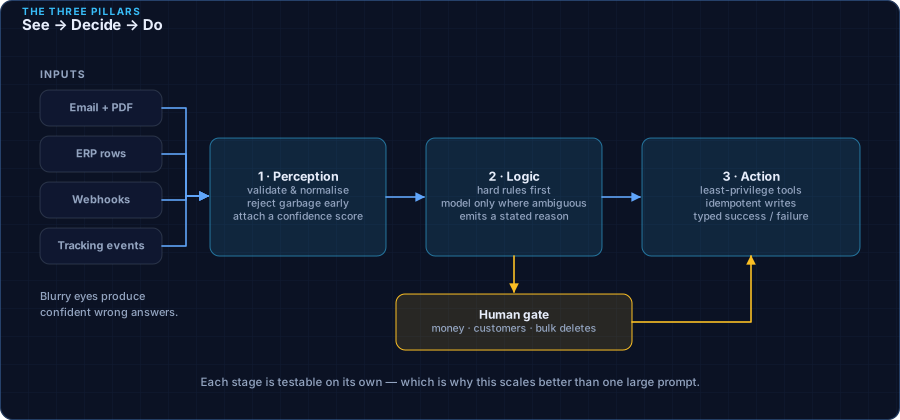
Perception means turning messy real-world inputs into clean, structured facts the rest of the system can trust.
Inputs might include:
- Emails and PDF attachments
- Rows in a warehouse or ERP table
- Webhook events from another app
- Sensor or shipment tracking messages
The perception layer’s job is not to be creative. It is to be consistent: validate fields, normalize dates and currencies, reject garbage early, and label confidence (“we are 98% sure this is the vendor ID”).
3. Pillar 2 — Logic (Decide)
Decision logic should be a mix of:
- Hard rules (policy, compliance, dollar limits)—fast, cheap, and predictable, and
- AI judgment only where judgment is needed (ambiguous text, unusual cases, prioritization).
This hybrid approach keeps costs down and reduces surprises. You do not need a large language model to check that “amount must be positive” or “approver required above $10,000.”
Good decision layers also produce an explanation: “Blocked because PO quantity is 10 and invoice quantity is 12.” That explanation is gold for auditors and for the human who gets the exception.
4. Pillar 3 — Action (Do)
Action is where agents create value—and risk. Every action should go through a controlled “tool” interface, similar to giving an employee access only to the buttons they need.
Healthy action design includes:
- Least privilege — the agent can update invoice status, not rewrite the entire vendor master file.
- Clear outcomes — success, bad input, rate limited, permission denied (like HTTP status codes).
- Idempotency — running the same approved action twice does not create double payments.
- Human gates — high-impact actions require explicit approval.
5. Putting the pillars together
A day-in-the-life flow for accounts payable might look like this:
- See: New invoice PDF arrives; perception extracts vendor, amount, PO number, and line items.
- Decide: Rules match PO; AI notes a 2% price variance; policy says approve under 3% if vendor is preferred.
- Do: Agent posts the approval package to the ERP and notifies the controller only if variance exceeds the threshold.
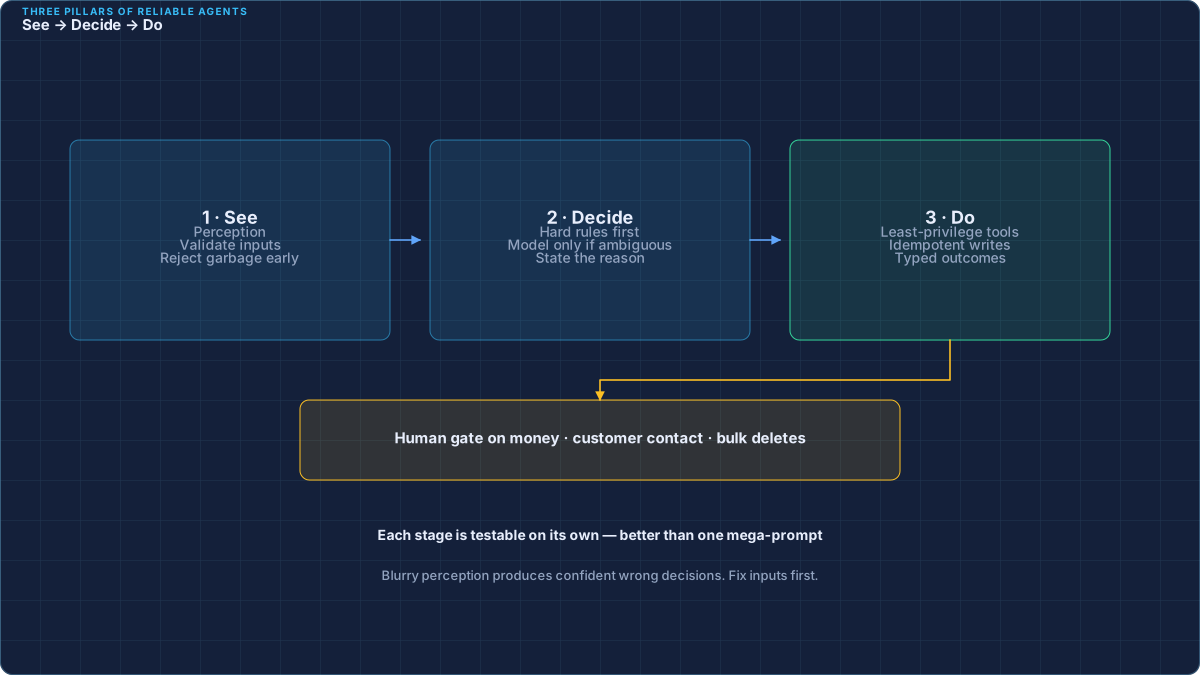
Each pillar can be tested on its own. That is why the architecture scales better than a single mega-prompt.
6. Common mistakes to avoid
- Starting with the model, not the workflow. Pick the business process first.
- Letting the agent free-write SQL or emails with no templates. Structure outputs.
- Skipping human review for money movement. Automate preparation; gate high risk.
- No metrics. If you cannot measure cycle time and exception quality, you cannot improve.
- Boiling the ocean. One workflow done well beats five half-finished pilots.
7. How to start this quarter
A practical 90-day path:
- Weeks 1–2: Choose one workflow; interview the people who live it; map systems and pain points.
- Weeks 3–6: Build perception + rules first; add AI only where needed; wire one or two safe actions.
- Weeks 7–10: Run in shadow mode (agent recommends, humans still click).
- Weeks 11–12: Turn on limited automation with approvals; publish results to leadership.
Cloudadorn’s Forward Deployed Engineers often embed with your team for this arc so knowledge stays in-house after launch.